Kubernetes (EKS) Deployment Guide
This guide covers deploying NexusAI capabilities to Amazon EKS using the Kubernetes Operator.
Overview
When you select EKS (Kubernetes) as your backend architecture, the Nexus Kubernetes Operator handles the deployment. The operator uses the Kubernetes pattern to:
- Provision AWS data services (DynamoDB, S3, Glue)
- Create SSM Parameters and Secrets Manager secrets
- Deploy frontend and backend containers
- Manage IAM roles with IRSA (IAM Roles for Service Accounts)
- Handle updates and deletions with proper cleanup
Prerequisites
EKS Cluster Requirements
| Requirement | Description |
|---|---|
| EKS Version | 1.23 or higher |
| OIDC Provider | Must be configured on the cluster |
| Node Groups | At least one node group with available capacity |
| kubectl Access | Configured access to the cluster |
IAM Permissions
The deployment user needs these permissions:
{
  "Effect": "Allow",
  "Action": [
    "eks:DescribeCluster",
    "eks:ListClusters",
    "eks:AccessKubernetesApi"
  ],
  "Resource": "*"
}
Verify Prerequisites
# Check EKS cluster access
aws eks describe-cluster --name your-cluster-name --region ap-southeast-1

# Check kubectl access
kubectl get nodes

# Verify OIDC provider
aws eks describe-cluster --name your-cluster-name \
  --query "cluster.identity.oidc.issuer" --output text
Architecture
When deploying to EKS, the following resources are created:
┌─────────────────────────────────────────────────────────────┐
│                     EKS Cluster                              │
│  ┌─────────────────────────────────────────────────────┐    │
│  │              nexus-system namespace                 │    │
│  │  ┌─────────────────────────────────────────────┐    │    │
│  │  │           Nexus Operator                    │    │    │
│  │  │  - Watches NexusAICapability CRs             │    │    │
│  │  │  - Provisions AWS resources                 │    │    │
│  │  │  - Deploys K8s workloads                    │    │    │
│  │  └─────────────────────────────────────────────┘    │    │
│  └─────────────────────────────────────────────────────┘    │
│                                                              │
│  ┌─────────────────────────────────────────────────────┐    │
│  │         {capability}-{env} namespace                 │    │
│  │  ┌──────────────┐    ┌──────────────┐              │    │
│  │  │   Frontend   │    │   Backend    │              │    │
│  │  │  Deployment  │    │  Deployment  │              │    │
│  │  └──────────────┘    └──────────────┘              │    │
│  │  ┌──────────────┐    ┌──────────────┐              │    │
│  │  │   Service    │    │   Service    │              │    │
│  │  │ (LoadBalancer)│   │ (LoadBalancer)│              │    │
│  │  └──────────────┘    └──────────────┘              │    │
│  └─────────────────────────────────────────────────────┘    │
└─────────────────────────────────────────────────────────────┘
                              │
                              ▼
┌─────────────────────────────────────────────────────────────┐
│                      AWS Services                            │
│  ┌──────────┐  ┌──────────┐  ┌──────────┐  ┌──────────┐    │
│  │ DynamoDB │  │    S3    │  │   Glue   │  │   IAM    │    │
│  └──────────┘  └──────────┘  └──────────┘  └──────────┘    │
│  ┌──────────┐  ┌──────────┐  ┌──────────┐                  │
│  │   SSM    │  │ Secrets  │  │ Cognito  │                  │
│  │ Params   │  │ Manager  │  │ (Auth)   │                  │
│  └──────────┘  └──────────┘  └──────────┘                  │
└─────────────────────────────────────────────────────────────┘
Deployment Flow
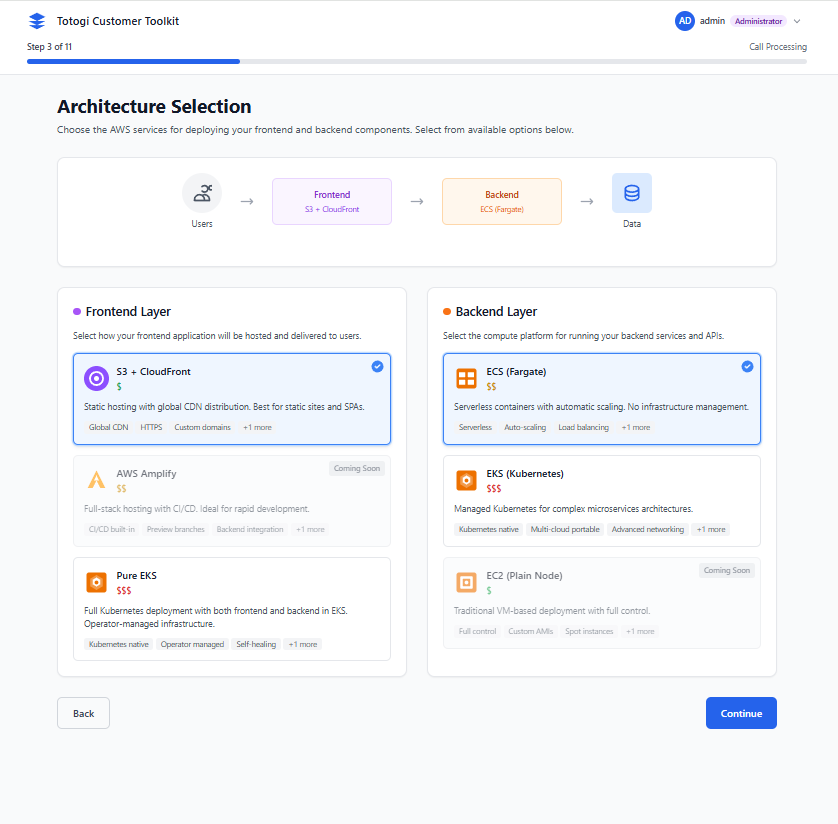
Step 1: Select EKS Architecture
In the Architecture Selection step, choose: - Frontend: CloudFront + S3 (recommended) - Backend: EKS (Kubernetes)
Step 2: Configure EKS Settings
When EKS is selected, additional configuration options appear:
| Setting | Description | Default |
|---|---|---|
| Cluster Name | Your EKS cluster name | Required |
| Namespace | Kubernetes namespace for deployment | {capability}-{env} |
| Replicas | Number of pod replicas | 2 |
Step 3: Operator Activation
The installer will:
1. Check if the Nexus Operator is installed
2. If not, deploy the operator to nexus-system namespace
3. Create the NexusAICapability custom resource
Step 4: Monitor Deployment
The deployment screen shows Kubernetes-specific stages:
 5%  - Initialization
15%  - Operator Verification
25%  - Namespace Creation
40%  - AWS Resources (DynamoDB, S3, Glue)
55%  - IAM Role with IRSA
70%  - Secrets and Config
85%  - Application Deployment
95%  - Service Creation
100% - Complete!
NexusAICapability Custom Resource
The operator manages deployments through NexusAICapability custom resources:
apiVersion: nexus.ai/v1
kind: NexusAICapability
metadata:
  name: nexus-ai-prod
  namespace: nexus-ai-prod
spec:
  capabilityName: nexus-ai
  version: "1.0.0"
  environment: prod
  region: ap-southeast-1

  frontend:
    enabled: true
    replicas: 2
    image: "123456789.dkr.ecr.ap-southeast-1.amazonaws.com/nexus-frontend:1.0.0"
    resources:
      requests:
        cpu: "100m"
        memory: "128Mi"
      limits:
        cpu: "500m"
        memory: "512Mi"

  backend:
    enabled: true
    replicas: 2
    image: "123456789.dkr.ecr.ap-southeast-1.amazonaws.com/nexus-backend:1.0.0"
    resources:
      requests:
        cpu: "250m"
        memory: "256Mi"
      limits:
        cpu: "1000m"
        memory: "1Gi"

  dataServices:
    dynamodb:
      enabled: true
    s3:
      enabled: true
    glue:
      enabled: true

  deletionPolicy: Delete  # or Retain for production
Managing EKS Deployments
View Deployments
# List all capabilities
kubectl get nexuscapabilities -A

# Short form
kubectl get tc -A

# Detailed status
kubectl describe tc nexus-ai-prod -n nexus-ai-prod
Check Application Status
# View pods
kubectl get pods -n nexus-ai-prod

# View services
kubectl get svc -n nexus-ai-prod

# Get application URLs
kubectl get svc -n nexus-ai-prod \
  -o jsonpath='{.items[*].status.loadBalancer.ingress[0].hostname}'
View Logs
# Frontend logs
kubectl logs -f deployment/nexus-ai-frontend -n nexus-ai-prod

# Backend logs
kubectl logs -f deployment/nexus-ai-backend -n nexus-ai-prod

# Operator logs
kubectl -n nexus-system logs -f deployment/nexus-operator
Scale Deployments
# Scale via kubectl
kubectl patch tc nexus-ai-prod -n nexus-ai-prod \
  --type=merge -p '{"spec":{"backend":{"replicas":5}}}'

# Or edit directly
kubectl edit tc nexus-ai-prod -n nexus-ai-prod
Update Image Version
kubectl patch tc nexus-ai-prod -n nexus-ai-prod \
  --type=merge -p '{"spec":{"backend":{"image":"123456789.dkr.ecr.ap-southeast-1.amazonaws.com/nexus-backend:2.0.0"}}}'
Delete Deployment
Note: AWS resources are deleted or retained based on deletionPolicy.
Operator Management
Check Operator Status
# Operator pods
kubectl get pods -n nexus-system

# Operator deployment
kubectl get deployment nexus-operator -n nexus-system

# Operator logs
kubectl -n nexus-system logs -f deployment/nexus-operator
Restart Operator
Update Operator
The installer automatically updates the operator when needed. For manual updates:
IRSA (IAM Roles for Service Accounts)
The operator configures IRSA for secure AWS access:
How It Works
- Operator creates an IAM role with trust policy for the service account
- Service account is annotated with the IAM role ARN
- Pods assume the IAM role automatically via OIDC
Trust Policy
{
  "Version": "2012-10-17",
  "Statement": [{
    "Effect": "Allow",
    "Principal": {
      "Federated": "arn:aws:iam::ACCOUNT:oidc-provider/oidc.eks.REGION.amazonaws.com/id/CLUSTER_ID"
    },
    "Action": "sts:AssumeRoleWithWebIdentity",
    "Condition": {
      "StringEquals": {
        "oidc.eks.REGION.amazonaws.com/id/CLUSTER_ID:sub": "system:serviceaccount:NAMESPACE:SERVICE_ACCOUNT"
      }
    }
  }]
}
Verify IRSA
# Check service account annotation
kubectl get sa -n nexus-ai-prod -o yaml

# Test AWS access from pod
kubectl exec -it deployment/nexus-ai-backend -n nexus-ai-prod -- aws sts get-caller-identity
Troubleshooting
Operator Not Running
# Check operator status
kubectl get pods -n nexus-system

# Check for errors
kubectl describe pod -l app.kubernetes.io/name=nexus-operator -n nexus-system

# View operator logs
kubectl -n nexus-system logs deployment/nexus-operator --tail=100
Capability Stuck in Provisioning
# Check capability status
kubectl describe tc <name> -n <namespace>

# Check operator logs for errors
kubectl -n nexus-system logs deployment/nexus-operator | grep <capability-name>
Pods Not Starting
| Issue | Cause | Solution |
|---|---|---|
ImagePullBackOff |
Image not found | Verify ECR image exists |
CrashLoopBackOff |
Application error | Check pod logs |
Pending |
No resources | Check node capacity |
# Describe pod for details
kubectl describe pod <pod-name> -n <namespace>

# Check events
kubectl get events -n <namespace> --sort-by='.lastTimestamp'
LoadBalancer Pending
# Check service
kubectl describe svc <name> -n <namespace>

# Verify AWS Load Balancer Controller (if using)
kubectl get pods -n kube-system | grep aws-load-balancer
IRSA Not Working
# Verify OIDC provider
aws eks describe-cluster --name <cluster> \
  --query "cluster.identity.oidc.issuer"

# Check service account
kubectl get sa -n <namespace> -o yaml

# Test from pod
kubectl exec -it <pod> -n <namespace> -- aws sts get-caller-identity
Best Practices
Production Deployments
- ✅ Use
deletionPolicy: Retainto preserve data - ✅ Set appropriate resource limits
- ✅ Configure at least 2 replicas
- ✅ Set up Pod Disruption Budgets
- ✅ Enable auto-scaling (HPA)
Security
- ✅ Use IRSA instead of access keys
- ✅ Restrict namespace access with RBAC
- ✅ Enable network policies
- ✅ Use private ECR repositories
Monitoring
- ✅ Set up Prometheus/Grafana
- ✅ Configure CloudWatch Container Insights
- ✅ Set up alerting for pod failures
- ✅ Monitor operator logs
Comparison: ECS vs EKS
| Feature | ECS Fargate | EKS (Kubernetes) |
|---|---|---|
| Setup Time | ~15 minutes | ~5 minutes (with existing cluster) |
| Cluster Required | No | Yes |
| Learning Curve | Low | Medium |
| Flexibility | Medium | High |
| Cost | Pay-per-use | Cluster fee + nodes |
| Scaling | Auto-managed | Custom HPA/VPA |
| Networking | VPC-native | CNI-based |
Choose ECS Fargate when: - No existing Kubernetes infrastructure - Prefer serverless approach - Simple deployment needs
Choose EKS when: - Existing EKS cluster - Kubernetes expertise on team - Need custom K8s configurations - Multi-cloud strategy
Next Steps
- Managing Deployments - Update and monitor deployments
- Troubleshooting - Common issues and solutions
- AWS Configuration - AWS setup and permissions