Kubernetes Operator Deployment
This section covers the Nexus Kubernetes Operator for deploying and managing NexusAI capabilities on Amazon EKS clusters.
Download Complete Documentation
Download PDF Guide - Complete documentation in a single PDF file for offline reading.
Overview
The Nexus Operator automates the full lifecycle of NexusAI capabilities in Kubernetes. When you create a NexusAICapability custom resource, the operator:
- Provisions AWS data services (DynamoDB, S3, Glue)
- Creates SSM Parameters and Secrets Manager secrets
- Creates IAM roles with IRSA (IAM Roles for Service Accounts)
- Deploys frontend and backend containers
- Creates an ALB Ingress with path-based routing
- Handles updates and deletions with proper cleanup
Key Features
- Automated AWS Provisioning - Creates DynamoDB tables, S3 buckets, Glue databases, and IAM roles
- Kubernetes Native - Uses Custom Resource Definitions (CRDs) for declarative management
- IRSA Integration - Secure IAM authentication using IAM Roles for Service Accounts
- ALB Ingress - Path-based routing with optional HTTPS via ACM certificates
- Cognito Authentication - Optional Cognito User Pool provisioning with PKCE OAuth flow
- Self-Healing - Reconciles desired state automatically
- Multi-Environment - Supports dev, staging, and production environments
Architecture
                        ┌──────────────────────────────┐
                        │     ALB (internet-facing)     │
                        │  /     -> frontend:8080       │
                        │  /api  -> backend:8000        │
                        └────────────┬─────────────────┘
                                     │
┌────────────────────────────────────┼───────────────────────────┐
│  EKS Cluster                       │                           │
│                                    │                           │
│  nexus-system namespace           │                           │
│  ┌────────────────────────┐        │                           │
│  │    Nexus Operator     │        │                           │
│  │  Watches CRs, provisions       │                           │
│  │  AWS + K8s resources   │        │                           │
│  └────────────────────────┘        │                           │
│                                    │                           │
│  {capability}-{env} namespace      │                           │
│  ┌──────────────┐  ┌──────────────┐                           │
│  │  Frontend    │  │  Backend     │                           │
│  │  Deployment  │  │  Deployment  │                           │
│  └──────────────┘  └──────────────┘                           │
│  ┌──────────────┐  ┌──────────────┐  ┌───────────────────┐   │
│  │ frontend-svc │  │ backend-svc  │  │ backend-svc-      │   │
│  │ (ClusterIP)  │  │ (ClusterIP)  │  │ internal (ClusterIP)│ │
│  └──────────────┘  └──────────────┘  └───────────────────┘   │
│  ┌─────────────────────────────────────────┐                  │
│  │  Ingress (ALB)                          │                  │
│  │  / -> frontend-svc   /api -> backend-svc│                  │
│  └─────────────────────────────────────────┘                  │
└───────────────────────────────────────────────────────────────┘
                             │
┌────────────────────────────┼──────────────────────────────────┐
│  AWS Services              │                                   │
│  ┌──────────┐ ┌──────────┐ ┌──────────┐ ┌──────────┐         │
│  │ DynamoDB │ │   S3     │ │  Glue    │ │  IAM     │         │
│  └──────────┘ └──────────┘ └──────────┘ └──────────┘         │
│  ┌──────────┐ ┌──────────┐ ┌──────────┐                      │
│  │   SSM    │ │ Secrets  │ │ Cognito  │                      │
│  │ Params   │ │ Manager  │ │(optional)│                      │
│  └──────────┘ └──────────┘ └──────────┘                      │
└───────────────────────────────────────────────────────────────┘
Available Documents
| Document | Description |
|---|---|
| Quick Start Guide | Get the operator running in minutes |
| AWS Prerequisites | IAM roles, permissions, and OIDC configuration |
| Architecture | Detailed architecture and component overview |
| Custom Resource Reference | Complete reference for NexusAICapability CRD |
| Deployment Guide | Step-by-step deployment instructions |
| Operations | Day-to-day management and operational procedures |
| Troubleshooting | Common issues and solutions |
E2E Deployment Pipeline
The e2e-deploy.sh script automates the full deployment lifecycle in 7 sequential steps.
./e2e-deploy.sh                                # Full 7-step deployment
./e2e-deploy.sh --skip-clean                   # Skip cleanup (steps 2-7)
./e2e-deploy.sh --skip-app-build               # Skip app image builds
./e2e-deploy.sh --skip-clean --skip-app-build  # Operator-only redeploy
Pipeline Overview

| Step | Name | Script / Command | What It Does | Skip Flag |
|---|---|---|---|---|
| 1 | Cleanup | operator-nexus-dev.sh delete --full |
Remove operator, IAM, ECR, ALB Controller. Refresh kubeconfig. | --skip-clean |
| 2 | Build Operator | build-and-push.sh |
Build nexus-operator image, push to ECR |
-- |
| 3 | Build Apps | nexus-backend/build.sh + nexus-ui/build.sh |
Build ai-job-engine + nexus-ui images, push to ECR |
--skip-app-build |
| 4 | Deploy Operator | operator-nexus-dev.sh deploy |
Create namespace, apply CRD + RBAC + Deployment, install ALB Controller | -- |
| 5 | Apply Capability | kubectl apply -f capability.yaml |
Create namespace, apply NexusAICapability CR, trigger reconciliation | -- |
| 6 | Monitor & Wait | operator-nexus-dev.sh monitor |
Watch AWS provisioning, wait for pods Ready, ALB DNS, HTTP response | -- |
| 7 | Verify | operator-nexus-dev.sh verify-capability |
Validate AWS resources, K8s workloads, app health, IRSA connectivity | -- |
Detailed Deployment Sequence
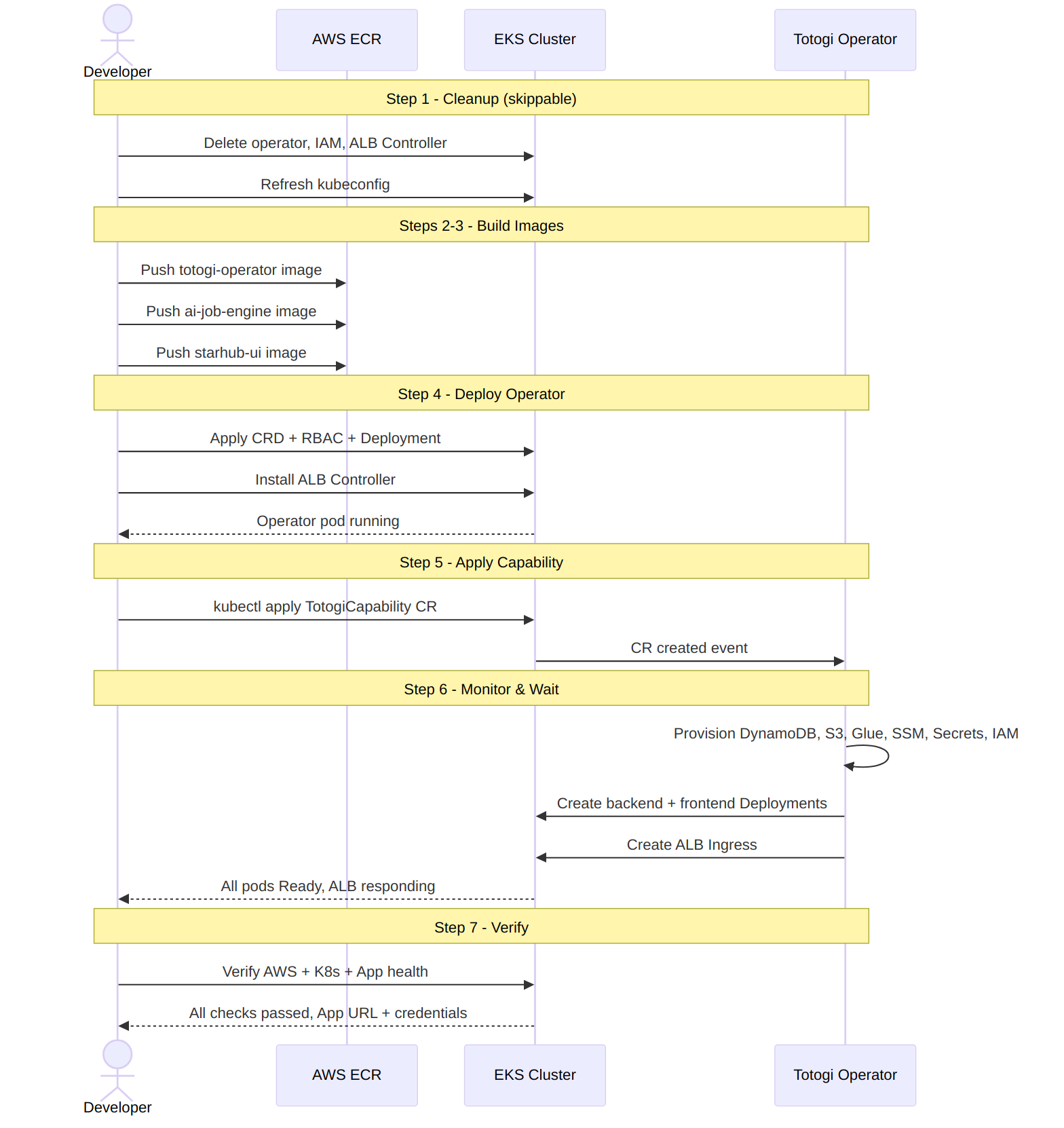
Quick Start
cd /opt/mycode/nexus/nexus-deployer/kube-operator

# 1. Scan cluster readiness
./operator-nexus-dev.sh scan

# 2. Build and push operator image
./build-and-push.sh

# 3. Deploy operator (auto-configures IRSA + ALB Controller)
./operator-nexus-dev.sh deploy

# 4. Deploy a capability
kubectl create namespace nexus-ai-prod
kubectl apply -f examples/nexus-ai-complete.yaml

# 5. Monitor deployment progress
./operator-nexus-dev.sh monitor

# 6. Verify everything
./operator-nexus-dev.sh verify-capability
Management Commands
All commands via ./operator-nexus-dev.sh:
| Command | Description |
|---|---|
scan |
Cluster readiness scan (IRSA, OIDC, nodes, ECR, access) |
deploy |
Deploy operator (auto-fixes IRSA, installs ALB Controller) |
delete |
Remove operator (keeps IAM, ECR, and your access) |
delete --full |
Complete cleanup (removes IAM, ECR, aws-auth, ALB Controller) |
update |
Force-redeploy operator with existing image |
status |
Check operator pod health |
monitor [ns/name] |
Real-time deployment progress for a capability |
verify-capability [ns] |
Verify AWS resources, K8s workloads, app health |
install-alb-controller |
Install/verify AWS Load Balancer Controller |
delete-alb-controller |
Remove ALB Controller and its IAM role |
fix-irsa |
Create OIDC provider in IAM if missing |
Operator Reconciliation Flow
When you apply a NexusAICapability, the operator executes these steps (visible via monitor):
| Step | Phase | What Happens |
|---|---|---|
| 1. DynamoDB | ProvisioningDataServices | Creates tables: {cap}-{env}-transformation-system, -license, -wxcc-task-tracking |
| 2. S3 | ProvisioningDataServices | Creates buckets: {cap}-{env}-call-data, -wxcc-simulator, -journey-logs, -journey-reports |
| 3. Glue | ProvisioningDataServices | Creates database {cap}_{env}_db and table {cap}_{env}_call_records |
| 4. SSM | ProvisioningSSM | Creates parameters under /{cap}/{env}/ (region, env, table names, bucket names, etc.) |
| 5. Secrets | ProvisioningSecrets | Creates secrets: {cap}/{env}/api-keys, /wxcc, /openai, /license, /anthropic, /github |
| 6. IAM | ProvisioningIAM | Creates {cap}-{env}-app-role with IRSA trust policy |
| 7. Namespace | Deploying | Creates namespace {cap}-{env} |
| 8. ServiceAccount | Deploying | Creates SA with IRSA annotation |
| 9. Backend | DeployingBackend | Deploys backend pods + ClusterIP services |
| 10. Frontend | DeployingFrontend | Deploys frontend pods + ClusterIP service |
| 11. Ingress | DeployingFrontend | Creates ALB Ingress with path-based routing |
Final status: Running (success) or Failed (with error message).
Example Capability
Minimal Example
apiVersion: nexus.ai/v1
kind: NexusAICapability
metadata:
  name: myapp-dev
  namespace: myapp-dev
spec:
  capabilityName: myapp
  version: "1.0.0"
  environment: dev
  region: ap-southeast-1

  frontend:
    replicas: 2
    image: "ACCOUNT.dkr.ecr.REGION.amazonaws.com/myapp-frontend:latest"

  backend:
    replicas: 2
    image: "ACCOUNT.dkr.ecr.REGION.amazonaws.com/myapp-backend:latest"

  dataServices:
    dynamodb: { enabled: true }
    s3: { enabled: true }
    glue: { enabled: true }

  deletionPolicy: Delete
Production Example with ALB Ingress
apiVersion: nexus.ai/v1
kind: NexusAICapability
metadata:
  name: nexus-ai-prod
  namespace: nexus-ai-prod
  labels:
    app.kubernetes.io/name: nexus-ai
    app.kubernetes.io/version: "2.5.0"
    nexus.ai/environment: prod
spec:
  capabilityName: nexus-ai
  version: "2.5.0"
  environment: prod
  region: ap-southeast-1
  enableCognito: false

  frontend:
    replicas: 3
    image: "764119721991.dkr.ecr.ap-southeast-1.amazonaws.com/nexus-ui:latest"

  backend:
    replicas: 3
    image: "764119721991.dkr.ecr.ap-southeast-1.amazonaws.com/ai-job-engine:latest"

  ingress:
    enabled: true
    scheme: internet-facing
    healthCheckPath: "/health"

  dataServices:
    dynamodb: { enabled: true }
    s3: { enabled: true }
    glue: { enabled: true }

  deletionPolicy: Delete
See examples/nexus-ai-complete.yaml for a complete working example.
Resource Naming Conventions
All resources follow consistent naming patterns:
| Resource | Pattern | Example |
|---|---|---|
| DynamoDB Table | {cap}-{env}-{purpose} |
nexus-ai-prod-license |
| S3 Bucket | {cap}-{env}-{purpose} |
nexus-ai-prod-call-data |
| SSM Parameter | /{cap}/{env}/{category}/{key} |
/nexus-ai/prod/aws/region |
| Secret | {cap}/{env}/{type} |
nexus-ai/prod/api-keys |
| Glue Database | {cap}_{env}_db |
call_processing_prod_db |
| IAM Role | {cap}-{env}-app-role |
nexus-ai-prod-app-role |
| K8s Namespace | {cap}-{env} |
nexus-ai-prod |
| K8s Deployment | {cap}-{env}-{component} |
nexus-ai-prod-backend |
| K8s Service | {cap}-{env}-{component}-svc |
nexus-ai-prod-frontend-svc |
| K8s Ingress | {cap}-{env}-app-ingress |
nexus-ai-prod-app-ingress |
| K8s ServiceAccount | {cap}-{env}-app-sa |
nexus-ai-prod-app-sa |
Prerequisites
| Requirement | Details |
|---|---|
| EKS Cluster | Kubernetes 1.23+ with OIDC provider configured |
| AWS CLI | Version 2.x with configured credentials |
| Python | Version 3.9+ with kubernetes, boto3, pyyaml |
| Docker | For building container images |
| Helm | Recommended, for ALB Controller installation |
| IAM Permissions | Admin access or specific operator permissions |
Environment Variables
| Variable | Description | Default |
|---|---|---|
AWS_REGION |
AWS region for resources | ap-southeast-1 |
EKS_CLUSTER_NAME |
Cluster name for OIDC discovery | (auto-detected) |
OPERATOR_NAMESPACE |
Namespace for operator | nexus-system |
LOG_LEVEL |
Logging verbosity | INFO |
Directory Structure
kube-operator/
  manifests/
    crd.yaml              # NexusAICapability CRD
    deployment.yaml       # Operator deployment manifest
    rbac.yaml             # ClusterRole and bindings
  src/nexus_operator/
    main.py               # Kopf handlers (create/update/delete)
    resources/
      dynamodb.py         # DynamoDB provisioner
      s3.py               # S3 provisioner
      glue.py             # Glue provisioner
      ssm.py              # SSM parameter provisioner
      secrets.py          # Secrets Manager provisioner
      iam.py              # IAM role provisioner (IRSA)
      kubernetes.py       # K8s resource creator (deployments, services, ingress)
      cognito.py          # Cognito provisioner (optional)
    utils/
      naming.py           # Resource naming conventions
      eks_utils.py        # OIDC provider discovery
  examples/
    nexus-ai-complete.yaml  # Full working example
  operator-nexus-dev.sh        # Management script
  build-and-push.sh               # Build and push operator image
  build-and-deploy.sh             # Build + deploy in one command
  e2e-deploy.sh                   # Full 7-step E2E deployment
  deploy-app-changes.sh           # Quick app rebuild + pod restart
  Dockerfile                      # Operator container image