AWS Configuration Guide
This guide covers AWS setup, authentication methods, and IAM permissions required for the NexusAI Deployer.
Authentication Methods
The installer supports multiple authentication methods to accommodate different security requirements and organizational policies.
1. IAM Role ARN (Recommended)
Best for: Cross-account deployments, security best practices, enterprise environments
How It Works
- You provide a Role ARN in the target AWS account
- The installer assumes this role using your source credentials
- All AWS operations are performed using the assumed role
Setup Steps
- Create the deployment role in your target AWS account
- Configure trust policy to allow role assumption
- Attach deployment permissions to the role
- Enter Role ARN in the installer
Example Role ARN
Trust Policy (for cross-account)
{
  "Version": "2012-10-17",
  "Statement": [
    {
      "Effect": "Allow",
      "Principal": {
        "AWS": "arn:aws:iam::SOURCE_ACCOUNT_ID:root"
      },
      "Action": "sts:AssumeRole",
      "Condition": {
        "StringEquals": {
          "sts:ExternalId": "your-external-id"
        }
      }
    }
  ]
}
2. AWS Access Keys
Best for: Quick setup, development environments, single-account deployments
How It Works
- You provide Access Key ID and Secret Access Key
- The installer uses these credentials directly
- Credentials are used for the session only (not stored)
Setup Steps
- Create IAM user with programmatic access
- Attach deployment permissions to the user
- Generate access keys in IAM Console
- Enter credentials in the installer
Security Best Practices
- ❌ Never commit access keys to source control
- ❌ Never share access keys
- ✅ Rotate keys regularly (every 90 days)
- ✅ Use MFA when possible
- ✅ Delete unused keys
3. AWS CLI Profile
Best for: Developers with existing AWS CLI setup, SSO users
How It Works
- You select a profile from your AWS CLI configuration
- The installer uses credentials from
~/.aws/credentials - Supports SSO profiles configured via
aws configure sso
Setup Steps
- Configure AWS CLI with
aws configure - Verify profile with
aws sts get-caller-identity --profile PROFILE_NAME - Select profile in the installer
Profile Configuration
# ~/.aws/credentials
[my-deployment-profile]
aws_access_key_id = AKIAIOSFODNN7EXAMPLE
aws_secret_access_key = wJalrXUtnFEMI/K7MDENG/bPxRfiCYEXAMPLEKEY
region = us-east-1
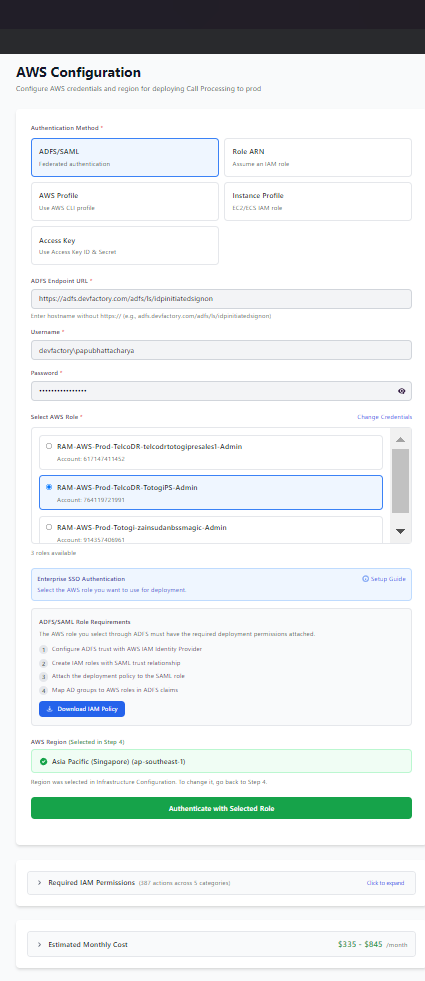
4. ADFS/SAML Authentication
Best for: Enterprise environments with Active Directory Federation Services
How It Works
- You enter ADFS URL and credentials
- The installer authenticates via SAML
- You select from available AWS roles
- Temporary credentials are obtained via STS
Setup Steps
- Enter ADFS URL (e.g.,
https://adfs.company.com/adfs/ls/IdpInitiatedSignOn.aspx) - Enter username and password
- Click "Fetch Roles" to retrieve available roles
- Select role and validate
Requirements
- ADFS configured with AWS as relying party
- User assigned to AWS roles in ADFS
- Network access to ADFS server
Credential Validation
After entering your credentials, click Test Credentials to validate:
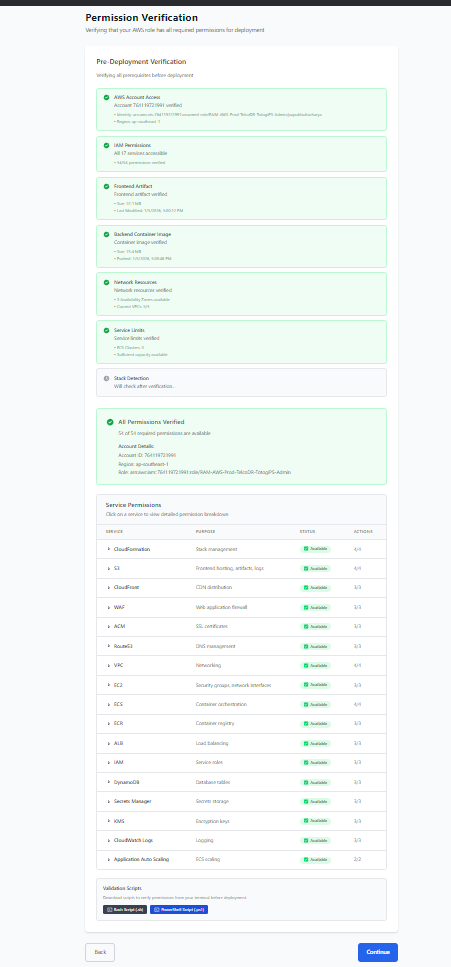
The system verifies: - ✅ AWS account access - ✅ STS identity verification - ✅ Account ID confirmation - ✅ Required IAM permissions
Required IAM Permissions
The deployment process requires permissions across multiple AWS services.
Minimum Required Permissions
{
  "Version": "2012-10-17",
  "Statement": [
    {
      "Sid": "CloudFormationPermissions",
      "Effect": "Allow",
      "Action": [
        "cloudformation:CreateStack",
        "cloudformation:UpdateStack",
        "cloudformation:DeleteStack",
        "cloudformation:DescribeStacks",
        "cloudformation:DescribeStackEvents",
        "cloudformation:DescribeStackResources",
        "cloudformation:GetTemplate",
        "cloudformation:ListStacks",
        "cloudformation:ValidateTemplate"
      ],
      "Resource": "*"
    },
    {
      "Sid": "IAMPermissions",
      "Effect": "Allow",
      "Action": [
        "iam:CreateRole",
        "iam:DeleteRole",
        "iam:GetRole",
        "iam:PassRole",
        "iam:AttachRolePolicy",
        "iam:DetachRolePolicy",
        "iam:PutRolePolicy",
        "iam:DeleteRolePolicy",
        "iam:CreateInstanceProfile",
        "iam:DeleteInstanceProfile",
        "iam:AddRoleToInstanceProfile",
        "iam:RemoveRoleFromInstanceProfile"
      ],
      "Resource": "*"
    },
    {
      "Sid": "VPCPermissions",
      "Effect": "Allow",
      "Action": [
        "ec2:CreateVpc",
        "ec2:DeleteVpc",
        "ec2:DescribeVpcs",
        "ec2:CreateSubnet",
        "ec2:DeleteSubnet",
        "ec2:DescribeSubnets",
        "ec2:CreateSecurityGroup",
        "ec2:DeleteSecurityGroup",
        "ec2:DescribeSecurityGroups",
        "ec2:AuthorizeSecurityGroupIngress",
        "ec2:AuthorizeSecurityGroupEgress",
        "ec2:RevokeSecurityGroupIngress",
        "ec2:RevokeSecurityGroupEgress",
        "ec2:CreateInternetGateway",
        "ec2:DeleteInternetGateway",
        "ec2:AttachInternetGateway",
        "ec2:DetachInternetGateway",
        "ec2:CreateNatGateway",
        "ec2:DeleteNatGateway",
        "ec2:DescribeNatGateways",
        "ec2:AllocateAddress",
        "ec2:ReleaseAddress",
        "ec2:DescribeAddresses",
        "ec2:CreateRouteTable",
        "ec2:DeleteRouteTable",
        "ec2:CreateRoute",
        "ec2:DeleteRoute",
        "ec2:AssociateRouteTable",
        "ec2:DisassociateRouteTable",
        "ec2:DescribeRouteTables",
        "ec2:DescribeAvailabilityZones"
      ],
      "Resource": "*"
    },
    {
      "Sid": "ECSPermissions",
      "Effect": "Allow",
      "Action": [
        "ecs:CreateCluster",
        "ecs:DeleteCluster",
        "ecs:DescribeClusters",
        "ecs:CreateService",
        "ecs:UpdateService",
        "ecs:DeleteService",
        "ecs:DescribeServices",
        "ecs:RegisterTaskDefinition",
        "ecs:DeregisterTaskDefinition",
        "ecs:DescribeTaskDefinition",
        "ecs:ListTasks",
        "ecs:DescribeTasks"
      ],
      "Resource": "*"
    },
    {
      "Sid": "ECRPermissions",
      "Effect": "Allow",
      "Action": [
        "ecr:CreateRepository",
        "ecr:DeleteRepository",
        "ecr:DescribeRepositories",
        "ecr:GetAuthorizationToken",
        "ecr:BatchCheckLayerAvailability",
        "ecr:GetDownloadUrlForLayer",
        "ecr:BatchGetImage"
      ],
      "Resource": "*"
    },
    {
      "Sid": "S3Permissions",
      "Effect": "Allow",
      "Action": [
        "s3:CreateBucket",
        "s3:DeleteBucket",
        "s3:ListBucket",
        "s3:GetBucketLocation",
        "s3:PutBucketPolicy",
        "s3:DeleteBucketPolicy",
        "s3:PutBucketWebsite",
        "s3:DeleteBucketWebsite",
        "s3:PutObject",
        "s3:GetObject",
        "s3:DeleteObject",
        "s3:PutBucketCORS"
      ],
      "Resource": "*"
    },
    {
      "Sid": "DynamoDBPermissions",
      "Effect": "Allow",
      "Action": [
        "dynamodb:CreateTable",
        "dynamodb:DeleteTable",
        "dynamodb:DescribeTable",
        "dynamodb:UpdateTable",
        "dynamodb:ListTables"
      ],
      "Resource": "*"
    },
    {
      "Sid": "CloudFrontPermissions",
      "Effect": "Allow",
      "Action": [
        "cloudfront:CreateDistribution",
        "cloudfront:UpdateDistribution",
        "cloudfront:DeleteDistribution",
        "cloudfront:GetDistribution",
        "cloudfront:ListDistributions",
        "cloudfront:CreateOriginAccessIdentity",
        "cloudfront:DeleteOriginAccessIdentity",
        "cloudfront:GetOriginAccessIdentity"
      ],
      "Resource": "*"
    },
    {
      "Sid": "Route53Permissions",
      "Effect": "Allow",
      "Action": [
        "route53:ChangeResourceRecordSets",
        "route53:GetHostedZone",
        "route53:ListHostedZones",
        "route53:ListResourceRecordSets"
      ],
      "Resource": "*"
    },
    {
      "Sid": "ACMPermissions",
      "Effect": "Allow",
      "Action": [
        "acm:RequestCertificate",
        "acm:DeleteCertificate",
        "acm:DescribeCertificate",
        "acm:ListCertificates"
      ],
      "Resource": "*"
    },
    {
      "Sid": "WAFPermissions",
      "Effect": "Allow",
      "Action": [
        "wafv2:CreateWebACL",
        "wafv2:DeleteWebACL",
        "wafv2:GetWebACL",
        "wafv2:UpdateWebACL",
        "wafv2:ListWebACLs",
        "wafv2:AssociateWebACL",
        "wafv2:DisassociateWebACL"
      ],
      "Resource": "*"
    },
    {
      "Sid": "CognitoPermissions",
      "Effect": "Allow",
      "Action": [
        "cognito-idp:CreateUserPool",
        "cognito-idp:DeleteUserPool",
        "cognito-idp:DescribeUserPool",
        "cognito-idp:UpdateUserPool",
        "cognito-idp:CreateUserPoolClient",
        "cognito-idp:DeleteUserPoolClient",
        "cognito-idp:AdminCreateUser",
        "cognito-idp:AdminSetUserPassword"
      ],
      "Resource": "*"
    },
    {
      "Sid": "ELBPermissions",
      "Effect": "Allow",
      "Action": [
        "elasticloadbalancing:CreateLoadBalancer",
        "elasticloadbalancing:DeleteLoadBalancer",
        "elasticloadbalancing:DescribeLoadBalancers",
        "elasticloadbalancing:CreateTargetGroup",
        "elasticloadbalancing:DeleteTargetGroup",
        "elasticloadbalancing:DescribeTargetGroups",
        "elasticloadbalancing:CreateListener",
        "elasticloadbalancing:DeleteListener",
        "elasticloadbalancing:DescribeListeners",
        "elasticloadbalancing:ModifyLoadBalancerAttributes"
      ],
      "Resource": "*"
    },
    {
      "Sid": "CloudWatchPermissions",
      "Effect": "Allow",
      "Action": [
        "logs:CreateLogGroup",
        "logs:DeleteLogGroup",
        "logs:DescribeLogGroups",
        "logs:CreateLogStream",
        "logs:PutLogEvents",
        "logs:PutRetentionPolicy"
      ],
      "Resource": "*"
    },
    {
      "Sid": "SecretsManagerPermissions",
      "Effect": "Allow",
      "Action": [
        "secretsmanager:CreateSecret",
        "secretsmanager:DeleteSecret",
        "secretsmanager:GetSecretValue",
        "secretsmanager:PutSecretValue",
        "secretsmanager:DescribeSecret"
      ],
      "Resource": "*"
    },
    {
      "Sid": "AutoScalingPermissions",
      "Effect": "Allow",
      "Action": [
        "application-autoscaling:RegisterScalableTarget",
        "application-autoscaling:DeregisterScalableTarget",
        "application-autoscaling:PutScalingPolicy",
        "application-autoscaling:DeleteScalingPolicy",
        "application-autoscaling:DescribeScalableTargets",
        "application-autoscaling:DescribeScalingPolicies"
      ],
      "Resource": "*"
    },
    {
      "Sid": "STSPermissions",
      "Effect": "Allow",
      "Action": [
        "sts:GetCallerIdentity",
        "sts:AssumeRole"
      ],
      "Resource": "*"
    }
  ]
}
Creating the IAM Policy
- Open IAM Console in AWS
- Go to Policies → Create Policy
- Select JSON tab and paste the policy above
- Name the policy (e.g.,
NexusAIDeploymentPolicy) - Create the policy
Creating the IAM Role
- Go to Roles → Create Role
- Select trusted entity:
- For same account: AWS service → EC2 (or your use case)
- For cross-account: Another AWS account → Enter account ID
- Attach the policy created above
- Name the role (e.g.,
NexusAIDeploymentRole) - Create the role
Cross-Account Deployment
Overview
Cross-account deployment allows you to deploy from one AWS account (source) to another (target).
Setup Steps
- In Target Account:
- Create IAM role with deployment permissions
-
Configure trust policy to allow source account
-
In Source Account:
- Ensure source credentials can assume the target role
Trust Policy Example
{
  "Version": "2012-10-17",
  "Statement": [
    {
      "Effect": "Allow",
      "Principal": {
        "AWS": "arn:aws:iam::111111111111:root"
      },
      "Action": "sts:AssumeRole",
      "Condition": {
        "StringEquals": {
          "sts:ExternalId": "nexus-deployment-12345"
        }
      }
    }
  ]
}
Security Recommendations
- Always use External ID for cross-account roles
- Limit source principals to specific users/roles
- Use MFA condition for sensitive deployments
- Audit role assumptions via CloudTrail
Troubleshooting Authentication
"Access Denied" Errors
- Verify credentials are correct
- Check IAM policy is attached
- Verify resource permissions (some actions need specific resources)
- Check for explicit denies in SCPs or permission boundaries
"Invalid Role ARN" Errors
- Verify ARN format:
arn:aws:iam::ACCOUNT_ID:role/ROLE_NAME - Check role exists in target account
- Verify trust policy allows assumption
"Session Expired" Errors
- Re-authenticate with fresh credentials
- For ADFS: Session tokens expire after 1 hour
- For assumed roles: Default session is 1 hour
"MFA Required" Errors
- Enable MFA on your IAM user
- Use session token with MFA code
- Or use role assumption with MFA condition
Best Practices
Security
- ✅ Use IAM roles instead of access keys when possible
- ✅ Enable MFA for all IAM users
- ✅ Use least privilege permissions
- ✅ Rotate credentials regularly
- ✅ Monitor with CloudTrail
Organization
- ✅ Use separate accounts for dev/staging/prod
- ✅ Use consistent naming conventions
- ✅ Document all IAM policies
- ✅ Review permissions quarterly
Automation
- ✅ Use Infrastructure as Code for IAM resources
- ✅ Automate credential rotation
- ✅ Set up alerts for unusual activity
Next Steps
- Deployment Wizard - Complete wizard walkthrough
- Managing Deployments - Update and delete deployments
- Troubleshooting - Common issues and solutions